By 2025 nearly every security vendor had added an AI assistant, and nearly every security team had somebody quietly using one whether or not it was approved. Week 11 deals with that directly.
The goal is not enthusiasm and it is not skepticism. It is knowing which tasks these tools are genuinely good at, which ones they are dangerous at, and how to tell the difference in the moment.
What Large Language Models Are Actually Good At
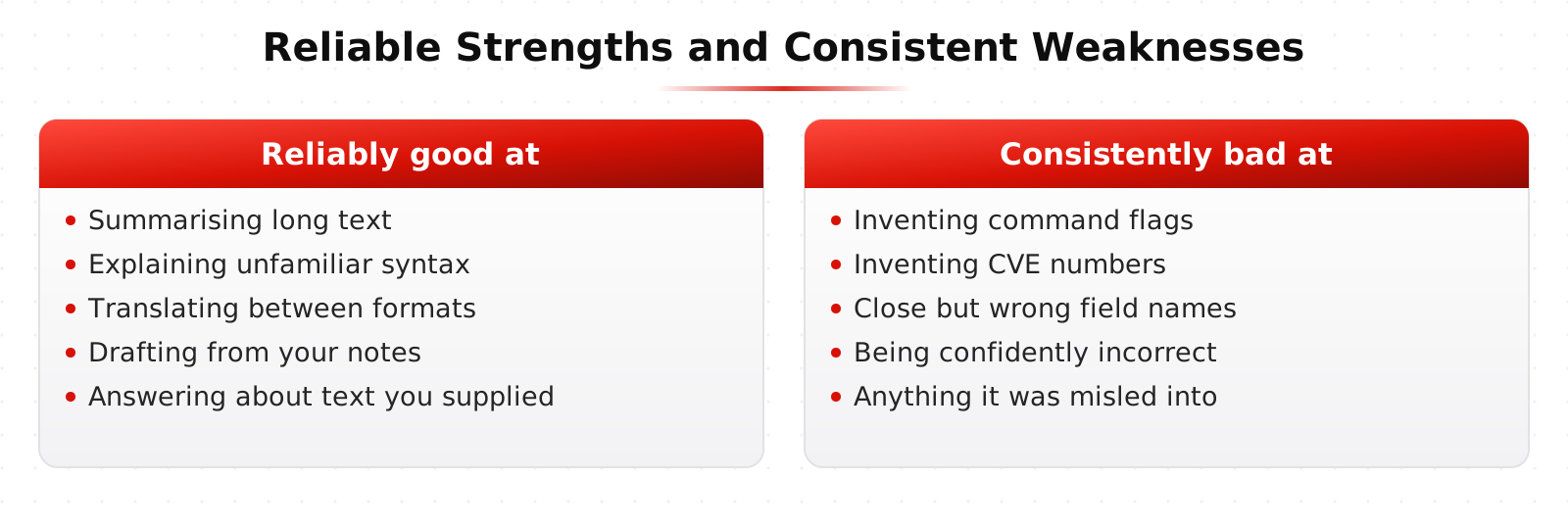
The reliable strengths are language shaped: summarizing long text, translating between formats, explaining unfamiliar syntax, drafting something you will edit, and answering questions about a document you provided.
Security work has a lot of those tasks. Explaining what a PowerShell command does. Turning a search from one query language into another. Summarizing 40 pages of vendor documentation into the three settings you care about. Writing the first draft of an incident report from your notes.
The weaknesses are just as consistent. These models produce fluent text whether or not they know the answer, they invent specifics such as command flags and CVE numbers, and they are easily misled by anything in their input that looks like an instruction.
AI in the SOC: Triage, Summarize, Respond
The highest value use in a SOC is compression. An analyst opens an alert and needs context: what is this host, who is this user, what fired, what happened around it. Assembling that by hand takes minutes per alert, and there are hundreds of alerts.
The second use is explanation. Junior analysts spend a lot of time not knowing what they are looking at, and a tool that can explain an encoded command line or an unfamiliar process is a real accelerator, as long as they know to verify it.
What does not work well is letting a model make the close-or-escalate decision on its own. The failure mode is quiet, because a wrongly closed alert produces no error message. More on this in AI in the SOC.
Testing Systems With AI: Source Driven Web App Review
The lab exercise is a source driven review of a web application. You have the code, and you use AI assistance to work through it faster than you could alone.
This works well because the model is reading text you gave it rather than recalling facts. It can spot patterns worth a second look: input reaching a query without parameterization, authorization checked in one handler and not the next, secrets in a config file, a dependency with a known problem.
Then you verify each one by hand. Some are real, some are wrong, and a few are subtly wrong in a way that would have wasted a day if you had trusted them. That is the whole lesson. See the OWASP Top 10 for the classes of flaw you are looking for.
Trust But Verify
The specific failure that hurts people in security is invented detail delivered with total confidence. A command flag that does not exist. A log field name that is close to the real one. A CVE identifier that belongs to something else entirely.
None of these announce themselves. They read exactly like the correct answer, which is why the verification habit has to be a habit rather than a decision you make when something feels off.
The rules the course teaches are simple. Never paste sensitive data into a tool without an agreement covering it. Never run a command you do not understand. Check every specific fact against the actual documentation or the actual data. Treat AI output as a lead, not a finding.
Prompt Injection Is Not Theoretical
If a model reads untrusted content, that content can contain instructions. A log entry, a web page, an email, or a support ticket can all carry text designed to redirect an assistant that processes it.
This matters more as tools get permission to act rather than just answer. The Open Worldwide Application Security Project publishes a Top 10 for Large Language Model Applications that puts prompt injection first, and it is worth reading in full. Our guide on prompt injection covers the attack and the defenses.
The Challenge: An AI Assisted Security Review
You run a review using AI assistance, then hand in two things: the findings, and a note on what the assistant got wrong.
Students who hand in only findings usually lose points, because the second list is the one that proves you were actually checking.
Learn This at HackRange
Week 11 pairs with Week 7 on shadow AI and with the whole AI section of the learning center. The material is updated as the tools change, which is often.