You already know how attackers think. This course shows you how software is actually built, so you can put security controls in the places that matter instead of the places that are easy.
Most security teams guard the finished building. Very few understand the construction site. For four weeks, five days a week, about three and a half hours a day, you follow a tiny application from a developer's keyboard all the way to production, and you put a control at every stage it passes through.
The course covers every topic in the SANS SEC540 (Cloud Native Security and DevSecOps Automation) outline and lines up with the GIAC GCSA objectives. It is not a SANS course, SANS and GIAC do not endorse it, and finishing it does not earn either credential. What it gives you is hands on time with every tool and idea on those outlines, which is the part that is hardest to get from a book. Every tool used is free and open source.
What You Can Do at the End
You do not need to become a full stack developer. You need to become the security person developers actually want in the room. By Day 20 you can open any repository and explain its language, dependencies, build, tests, and road to production in about a minute. You can follow a dependency from a manifest through a resolver, registry, cache, and lockfile to the bytes inside a release.
You can run SAST, secrets scanning, SCA, SBOM generation, container scanning, and infrastructure as code scanning, then turn a finding into a real fix with a test. You can harden a CI/CD pipeline, write Terraform, lock down Kubernetes with RBAC and admission policies, put a gateway and mutual TLS in front of microservices, and automate compliance. Then you prove every gate works by trying to break it.
How a Day Works
Every day has the same shape. Part 1 is about 45 minutes of concepts and diagrams. Part 2 is another 45 minutes, one level deeper. The lab is 90 to 120 minutes of hands on work with annotated terminals and spot the bug challenges. The last 15 minutes go into your learning log and the day's one page cheat sheet.
Each day also has a video recap. Every Friday ends with a quiz you can retake as often as you like, and the course closes with a final exam. The certificate needs every quiz and the final passed.
It is built for visual learners. Every idea comes with a diagram, and every lab step comes with an annotated terminal. If a paragraph ever feels like a wall, skip to the next picture.
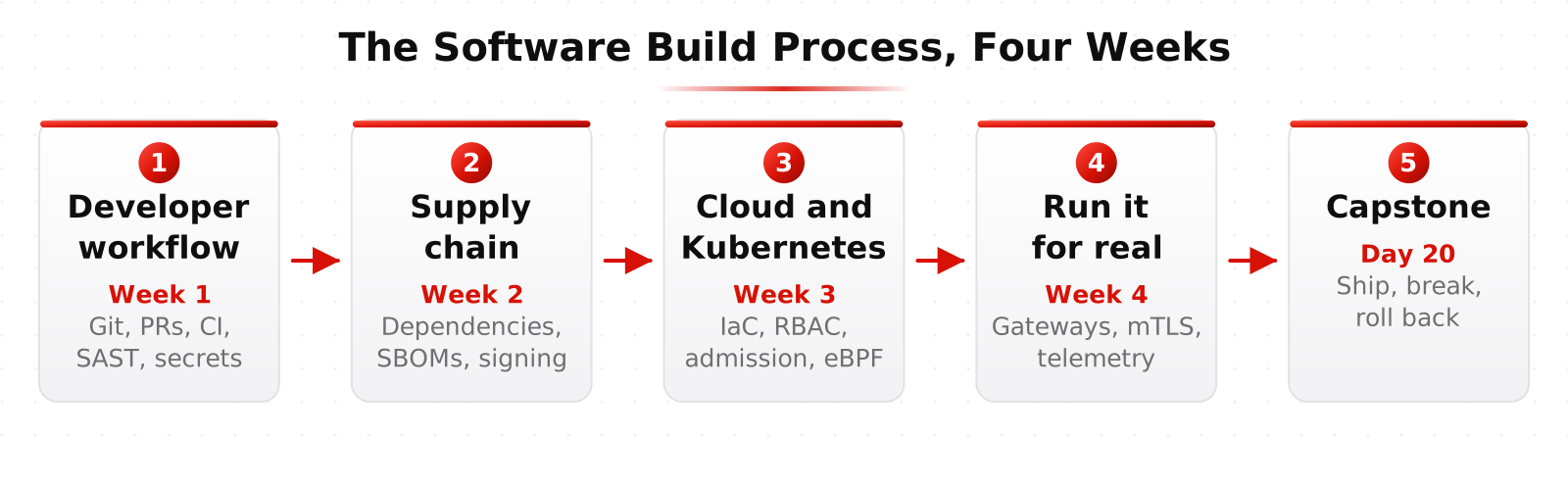
Week 1: The Developer Workflow, and Securing It
Day 1 is what developers actually do all day, and the anatomy of a repository. Day 2 treats Git as a graph and the pull request as a security control, with rulesets and CODEOWNERS. Day 3 separates continuous integration, continuous delivery, and continuous deployment, and puts GitHub Actions and GitLab CI side by side.
Day 4 is shifting left without shoving developers, and how SAST works and how to read its output. Day 5 is secrets: how they leak, and how vaults, secret managers, and short lived credentials stop them.
The labs are Make It Run, The Reviewed Change, Green Red Green, Stop It Before It Lands, and Lock It in the Vault.
Week 2: Dependencies, Containers, and the Supply Chain
Day 6 is how npm decides what you install, Python packaging, and dependency confusion. Day 7 covers Maven, Debian, and RPM packages, then takes a container image apart. Day 8 is SCA and SBOMs, and triage with CVE, CWE, CVSS, EPSS, KEV, and VEX.
Day 9 is building better container images, then linting, scanning, and enforcing image policy. Day 10 is SLSA, provenance, and signing, followed by attacking and hardening the pipeline itself.
The labs are Follow the Bytes, Ecosystem Safari, The Triage Desk, Shrink the Blast Radius, and Attack and Armor the Pipeline.
Week 3: Cloud Infrastructure and Kubernetes
Day 11 is infrastructure as code and securing cloud infrastructure code. Day 12 is configuration management and golden images, then the secure SDLC and threat modeling. Day 13 is how Kubernetes works, and its resources, Kustomize, and Helm.
Day 14 is Kubernetes risks, RBAC, and workload identity. Day 15 is pod security and admission control, then runtime security with eBPF.
The labs are Terraform the Network Safely, Bake It and Prove It, First Contact, Least Privilege, and The Bouncer at the Door.
Week 4: Microservices, Operations, Compliance, and the Capstone
Day 16 is microservices and identity, then secure coding and regression tests. Day 17 is API gateways, service to service security, and zero downtime deployments. Day 18 is logs, metrics, and traces, plus Kubernetes logs, audit, and alerts.
Day 19 is continuous compliance and automated remediation. Day 20 is the capstone: you ship a real release, attack your own gates, and roll it back.
The labs are Who Goes There, Guard the Front Door, See Everything, The Self-Healing Cloud, and Prove It.
Your Lab
Every lab runs on a Linux workstation preloaded with every tool in the course, including Git, Semgrep, Gitleaks, Trivy, Syft, Grype, cosign, OPA, Checkov, OpenTofu, Terraform, Vault, kubectl, and Helm. Alongside it you get a lab Git server, a package registry, a code scanner, and in Weeks 3 and 4 your own Kubernetes cluster.
You can run it two ways. The Online Lab runs on HackRange servers and opens in your browser in about a minute, with nothing to install. The Local Lab runs in an Ubuntu virtual machine on your own computer with no time limit, and needs a strong machine, at least 24 GB of memory and 150 GB of free disk. Its installer and guide are free on GitHub.
The workstation is disposable on purpose. If it is not pushed, it does not exist, which is the same habit real build systems enforce. Six days also use a free GitHub account for features nothing else is the reference for, such as Actions, code scanning, and keyless signing.
Test the Product, Not the Name
Two product categories come up all month: package firewalls and curated repositories that sit between your builds and public registries, and SAST and secrets platforms that scan source code. The course teaches them as categories, so the lessons apply whichever vendor your company picks.
The habit it builds is simple. A tool called "Firewall" might happily serve a bad package from its cache. A tool called "SAST" might skip whole languages. Every time one shows up, you build a capability test matrix: what should happen, what actually happened, and what the product does not cover at all.
Learn This at HackRange
This course is aimed at people who already work in security and want to understand the build pipeline they are asked to protect. Comfort on a Linux command line helps; if you are not there yet, start with Specializing in Linux.